
Smart pool automation is a central controller that connects your pool equipment, such as the pump, heater, lights and water features, so you can run it all on schedules or from your phone. It works on new pools and, in many cases, on pools you already own. The right system depends on how many pieces of equipment you have, which brands they are and how your home network behaves at the pool. Below is how it works, what it controls, what retrofits involve and how to choose, with a Florida homeowner in mind.
Quick Answers
-
A smart pool automation system is one controller that links your pump, heater, lights, water features and more, then lets you operate them from an app or a panel.
-
Phone control needs a compatible controller on your home Wi-Fi plus the manufacturer’s app. A weak signal at the equipment pad is the most common snag.
-
Many existing pools can be upgraded, but wiring, distance from power, electrical capacity and equipment compatibility shape the work and the price.
-
Smart pool automation may help reduce energy consumption through optimized pump speeds and equipment schedules, although actual savings vary by pool.
-
Choose by the number of devices and bodies of water you need to control, not by app screenshots.
What a Smart Pool Automation System Actually Is
A pool automation system typically includes three components: a central controller, relays or actuators that operate connected equipment, and an interface such as a wall panel or mobile app. Together, these components replace separate manual controls with coordinated equipment management.
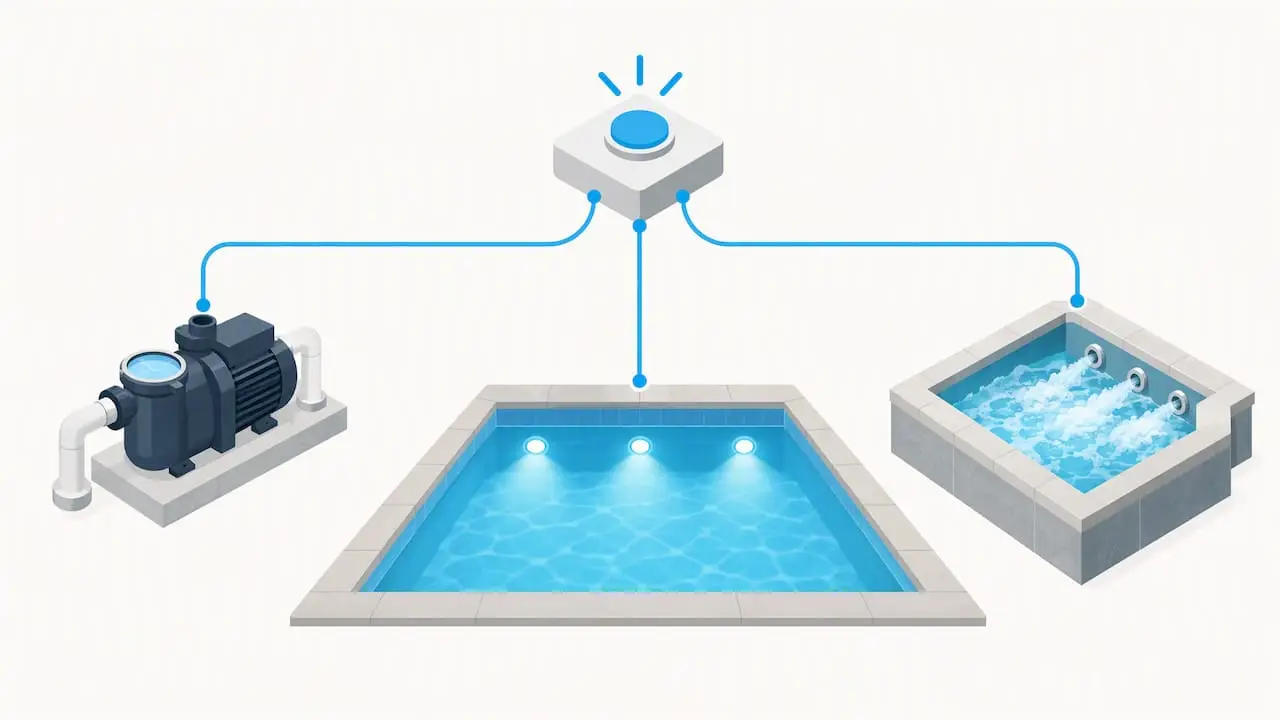
A smart pool automation system coordinates equipment such as pumps, heaters, lighting, spas, and water features through one central controller. Depending on equipment compatibility, homeowners can program schedules, adjust water temperatures, manage pump speeds, and operate connected features remotely.
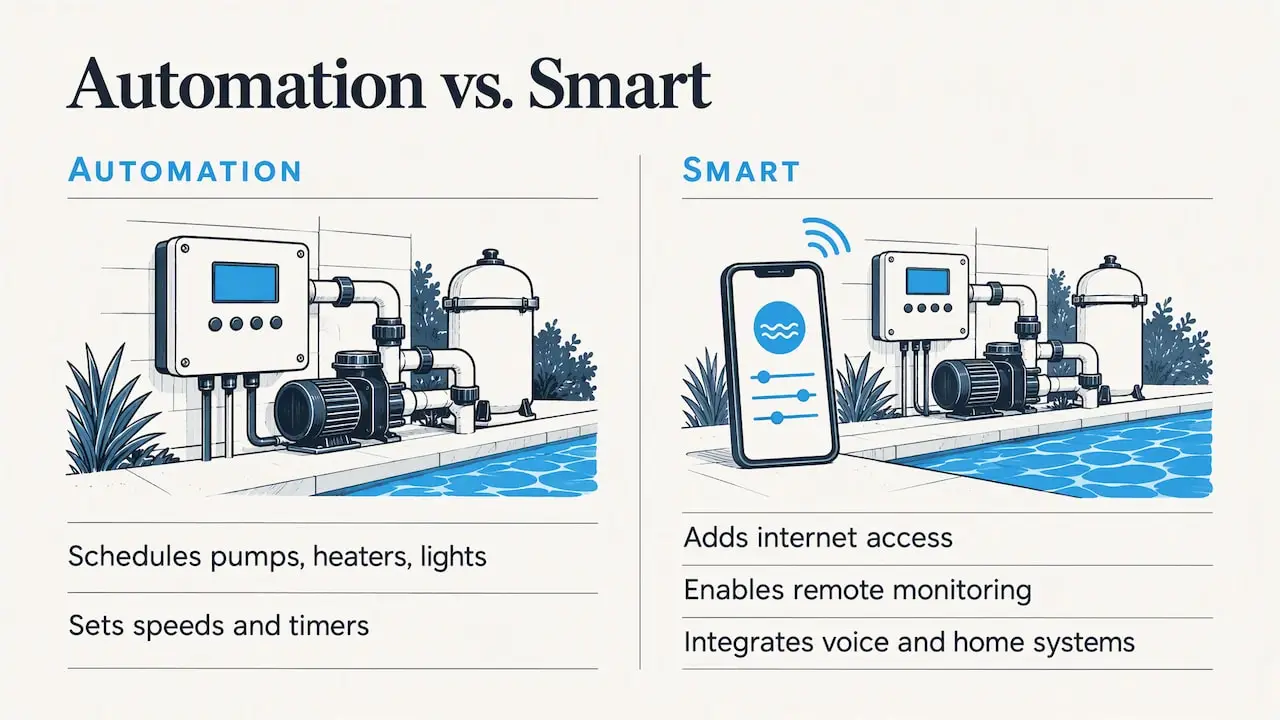
The word “smart” usually means two extra layers on top of basic automation: internet connectivity for remote access and monitoring, and integration with other systems, such as voice assistants or a whole-home control platform.
What Each Part Does
| Part | Job | Why it matters |
|---|---|---|
| Controller | Runs schedules and logic | Sets how many devices you can add later |
| Relays and actuators | Switch equipment on and off, turn valves | Valves are what let one pump serve a pool, a spa and a water feature |
| Sensors | Read water temperature, and in some systems chemistry | Enable heater control and automatic dosing |
| App and panel | Your day-to-day interface | Where schedules, scenes and alerts live |
How to Control Your Pool From Your Phone
Controlling a swimming pool from your phone requires a compatible automation controller connected to your home network and the manufacturer’s mobile application. Once configured, a smart pool control system allows homeowners to manage supported equipment remotely.
For example, Hayward’s OmniLogic pool automation system allows homeowners to manage compatible pumps, heaters, lighting, water features, and equipment schedules through its mobile app.
Depending on the system and connected equipment, homeowners can control:
-
Pool pumps: Adjust operating schedules and variable-speed settings.
-
Heaters and spas: Manage water temperatures and heating schedules.
-
Pool lighting: Turn lights on or off and select available colors.
-
Water features: Activate waterfalls, bubblers, and other connected features.
-
Equipment monitoring: View supported system settings and notifications.
Before choosing a system, confirm compatibility with your existing pool equipment and ensure reliable internet connectivity near the equipment pad.
Scenes Are the Feature You Will Use Most
A scene bundles several actions into one tap. A “swim” scene might start the pump at a higher speed, turn on the underwater lights and raise the spa jets. A “close the pool” scene reverses it. Creating a few commonly used scenes can simplify daily pool operation.
Check the Signal Before You Buy
The controller sits at the equipment pad, often in a corner of the yard or a side yard. If your Wi-Fi barely reaches there, the app will be unreliable regardless of brand. A Wi-Fi extender or a wired connection to the pad solves most of it, and it is worth planning for before the equipment goes in.
What Pool Automation Can Control
The list grows with every equipment generation, but the common core is stable:
-
Pumps: variable-speed schedules, plus speed changes when a feature runs.
-
Heaters and heat pumps: setpoints and timing, including spa-heating priority.
-
Lighting: on/off, colors and themes for LED fixtures.
-
Water features: sheer descents, deck jets, bubblers, fountains and spillover spa transfers.
-
Sanitization: salt-system monitoring and output, depending on the brand.
-
Cleaners: run schedules for compatible cleaners.
-
Valves: the actuators that redirect water between pool, spa and features.
If you are planning a spa spillover or a sheer descent, plan automation from the start. Our spas and water features work depends on the valves and pump speeds your controller can coordinate.
Can You Add Automation to an Existing Pool?
Yes, many existing swimming pools can be upgraded with smart pool automation. However, wiring, electrical capacity, equipment compatibility, and network connectivity can affect installation requirements and costs.
There are three common approaches to retrofitting pool automation:
-
Upgrade an existing controller. Some older automation systems support compatible replacement panels or updated control modules, allowing homeowners to retain certain existing components without replacing the entire system.
-
Add a controller to older equipment. Pools with manual timers or older pumps may require a new controller, relays, electrical modifications, or valve actuators. A variable-speed pump upgrade may also be recommended.
-
Choose a compatible multi-brand system. Some automation systems support equipment from multiple manufacturers. For example, Latham’s smart pool automation announcement describes its Attendant system, developed with Poolside Tech, for compatible fiberglass pool installations.
Before upgrading, have a qualified pool professional evaluate your existing equipment, electrical connections, plumbing configuration, and network connectivity.
Questions to Settle Before a Retrofit
-
Is your equipment pad’s electrical service sized for the new load?
-
Are your existing valves automatable, or do they need actuators?
-
Is the pump variable speed, and does it speak the controller’s language?
-
Does Wi-Fi reach the pad?
If any answer is “I don’t know,” have a pool professional inspect the pad before you pick a controller. Our pool equipment services team handles upgrades like this for existing pools.
How to Choose a System: What to Compare
The best smart pool automation system depends on your existing equipment, the number of features you want to control, and whether you plan to add a spa or other upgrades. Compare equipment compatibility, controller capacity, scheduling options, and remote access before selecting a system.
Capacity
Controllers vary in how many devices they can manage. Count the pumps, heaters, lights, valves, spas, and water features you want to automate. Consider future additions so your system has sufficient capacity for planned upgrades.
App and Ecosystem
Some smart pool automation systems integrate with compatible smart-home platforms, allowing homeowners to manage pool functions alongside other connected devices. For example, Hayward’s pool automation systems offer remote equipment control and compatibility with supported smart-home platforms, including voice-assistant functionality on certain systems.
Before purchasing, verify that the controller supports your preferred mobile app, smart-home platform, and existing pool equipment.
Matching Equipment
A controller is only as useful as the equipment it can operate. Not every automation system works with every pump, heater, sanitizer, or lighting system. Confirm compatibility before purchasing, particularly when upgrading an existing pool with equipment from different manufacturers.
For simpler swimming pools, a variable-speed pump with built-in scheduling and connectivity may provide sufficient control without requiring a complete automation system.
Quick Decision Guide
| Your situation | Lean toward |
|---|---|
| Simple pool, one pump, lights and a heater | Pump-based or entry-level control |
| Pool and spa with spillover or water features | Full controller with valve actuators |
| Whole-home smart system already in place | A controller with documented integration for that platform |
| Existing equipment from one brand | Same-brand upgrade path |
What Smart Pool Automation Costs
We do not publish a flat price because the controller is rarely what drives the invoice. The same controller can cost very different amounts to install depending on what surrounds it:
-
Electrical capacity at the pad and whether the load center needs work.
-
Actuators and sensors for each valve and temperature reading.
-
Communication wiring between the controller, equipment and remote panels.
-
Existing equipment that may or may not be compatible, such as an older single-speed pump.
-
Labor and site conditions, including distance and whether trenching is needed.
-
Chemistry modules if you want automated sanitizer and pH control.
Online price ranges vary widely and are mostly written by retailers, so treat them as rough. A written quote after a pad inspection is the only reliable number. When automation is included in a new pool, it is priced as part of the whole build, which usually avoids retrofit costs like added wiring and trenching.
Energy and Maintenance Savings: What to Expect
Smart pool automation can improve convenience and help homeowners manage energy consumption by coordinating pump schedules, heating, lighting, and other equipment. Actual savings depend on the equipment installed, operating settings, and how frequently the pool is used.
According to the EPA ENERGY STAR pool pump guidelines, variable-speed pool pumps can reduce energy consumption by operating at lower speeds appropriate for filtration and other pool functions.
Several factors influence potential savings:
-
Pump speed: Variable-speed pumps can reduce energy consumption when operated at appropriate lower speeds.
-
Heating schedules: Programming heaters around swimming times may reduce unnecessary heating.
-
Equipment coordination: Automation can help prevent compatible equipment from operating when it is not needed.
-
Seasonal adjustments: Updating schedules throughout the year helps match equipment operation to changing conditions.
While energy-efficient pool automation can reduce unnecessary equipment operation, savings vary by pool and should not be based on manufacturer advertising claims.
Our Perspective: Plan Automation Before the Pool, Not After
Planning pool automation during new pool construction allows homeowners to coordinate plumbing, electrical connections, equipment placement, and future upgrades before installation begins. Properly positioned valves, accessible equipment, and reliable network connectivity can make the system easier to operate and expand over time.
That is why automation comes up in our collaborative 3D design sessions. Before a shovel hits the ground, we talk about which features you want to run from a phone: the spa, the lights, a sheer descent, a fire feature on the patio. Then we lay out the equipment pad to support them.
Our advice for most Florida homeowners is to buy for the features you want in five years, not the ones you have today. Adding a spa or a second water feature later is much easier when the controller has spare relays and the pad has room.
— The Agua Pools Team
Automation Built Into Your Pool Project
We design, build and equip pools across North and Central Florida, including pool automation and LED lighting and the equipment behind it, such as pumps, filters, heaters, heat pumps and cleaners. Planning a new build? See our new pool construction process, or start with custom pool design to preview your pool and its controls in 3D.
Frequently Asked Questions About Pool Automation
Is Smart Pool Automation Worth It?
For most owners with a pump, heater and lights, yes, mainly for convenience and for scheduling the pump more efficiently. If you have a spa, water features or a pool you want to monitor while traveling, the value rises. For a very simple pool, an entry-level pump with built-in control may be enough.
Can I Control My Pool From My Phone Away From Home?
Yes, if your controller is connected to your home internet and you use the manufacturer’s app. Apps from the major brands let you adjust heater temperatures, lights and schedules remotely, and receive alerts. Make sure the equipment pad has a reliable signal first.
What Is the Best Pool Automation System?
There is no single best one. The best system is the one that supports the number of devices you have, works with your equipment brand and fits the smart-home platform you already use. Count your devices, check compatibility and ask for a written quote after an on-site look.
How Much Does Pool Automation Cost to Install?
It depends on electrical work, valve actuators, sensors, wiring and the equipment you already have, so the controller price alone is misleading. A pad inspection and a written quote are the most reliable way to get a real figure. Adding automation during a new build is usually more efficient than retrofitting.
Talk to a Florida Pool Team About Automation
Whether you’re planning a new swimming pool or upgrading existing equipment, Agua Pools provides smart pool automation solutions throughout North and Central Florida.
Serving Ocala, St. Johns, Daytona Beach, Palm Coast, Jacksonville, and Tallahassee, Agua Pools works with homeowners across Marion, St. Johns, Volusia, Flagler, Duval, and Leon counties.
Explore our pool automation and LED lighting options or contact Agua Pools to discuss your swimming pool project.